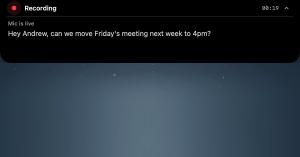
The recording interface from ShoutFlow sits around the MacBook notch, displaying a live transcript as the user talks; the finalized text gets placed at the cursor location inside any application.
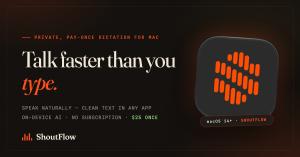
This new menu-bar application turns spoken words into polished, structured text across all Mac apps for a single fee of $25. No recurring charges are required, and audio processing happens locally on the computer.
Voice dictation has shifted toward monthly charges of fifteen dollars that send your speech to the cloud. ShoutFlow takes the opposite approach: buy it once, it’s yours, and your audio never has to leave your Mac”— Lewis Cookson, co-founder of ShoutFlowLONDON, UNITED KINGDOM, August 8, 2026 /EINPresswire.com/ — Recurse LTD has announced the official debut of ShoutFlow, an AI-powered dictation tool for the Mac that
transforms spoken words into neat, ready-to-send text across any application — priced at a one-time $25
instead of a recurring monthly fee.
Speech has quietly emerged as one of the quickest methods for writing: most individuals speak roughly three times
faster than they can type. However, the leading Mac dictation tools now demand $10–$15 every month and send
recordings through their own remote servers. ShoutFlow was designed on a completely different philosophy. It is a
single upfront purchase, and by default it handles audio processing on the Mac itself, employing speech models that operate
locally on Apple Silicon — meaning in local mode, a user’s voice never exits their machine.
ShoutFlow is located in the menu bar. Users activate a hotkey, start speaking, and see a live preview of their
words appear in a small recording overlay that fits neatly around the MacBook notch or can be positioned
anywhere on the display. When they finish, ShoutFlow processes the audio, removes filler words, adjusts
punctuation and formatting, and places the completed text directly at the cursor — within Mail, Slack,
Safari, a code editor, or any other program.
“Dictation has drifted into fifteen-dollar monthly subscriptions that upload your voice to the
cloud,” said Lewis Cookson, founder of ShoutFlow. “ShoutFlow is the opposite: pay once, own it, and
your audio can stay on your Mac.”
Main features at launch:
– Operates across the entire system: dictate into any macOS application, with text automatically placed at the cursor
and a clipboard fallback option.
– Local processing as standard: transcription and text refinement run on Apple Silicon hardware; in local
mode, no audio gets transmitted anywhere.
– Real-time preview: observe words appearing as you talk, inside an overlay crafted for the MacBook notch.
– Customization: a personal dictionary for names and specialized terms, reusable text snippets, and per-app tones
so a Slack message differs in style from a formal email.
– Dictation log: every recording is stored locally and can be retrieved and copied later.
– Optional bring-your-own-key cloud mode: users who favor cloud-based models can link their own
OpenAI, Google Gemini, OpenRouter, DeepSeek, Kimi, or xAI account. Keys are stored in the macOS
Keychain and audio travels directly from the Mac to the chosen provider — never passing through ShoutFlow’s
servers.
ShoutFlow is available for $25 as a one-time purchase, and a single license covers two Macs. No
subscription or account is needed to test it: a seven-day free trial begins with a single click and
does not request any credit card details. The application is a signed, notarized direct download from
https://shoutflow.ai and requires macOS 14 or later on an Apple Silicon Mac (M1 or newer).
The release positions ShoutFlow against a market that has increasingly moved toward subscription pricing.
Over three years, a $12-per-month dictation subscription adds up to more than seventeen times
ShoutFlow’s single payment. For writers, developers, founders, and anyone managing a high
volume of email, ShoutFlow aims to establish speech as the default writing method on the Mac — without a
recurring charge and without sending recordings to an outside party.
ShoutFlow is available now at https://shoutflow.ai.
Lewis Cookson
Recurse LTD
email us here
Visit us on social media:
YouTube
X
Local Dictation for Mac, No Subscription: ShoutFlow Walkthrough