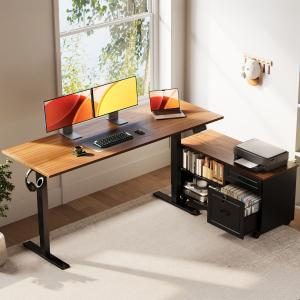
A detailed examination of the OffiGo mobile file cabinet, which pairs open shelving with lockable drawers and a generous top area designed for office gear.
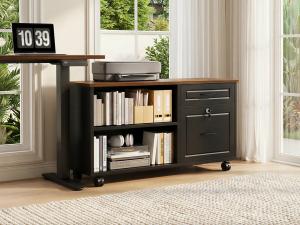
A bright home office scene featuring an OffiGo standing desk alongside a matching mobile storage unit, creating a more organized and adaptable work environment.

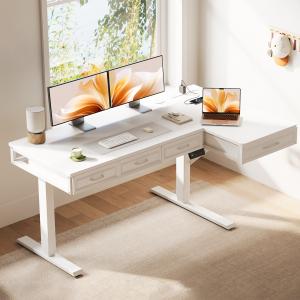
OffiGo 63 inch L-Shaped Electric Standing Desk with Fabric Drawers and Built-in Power Outlets
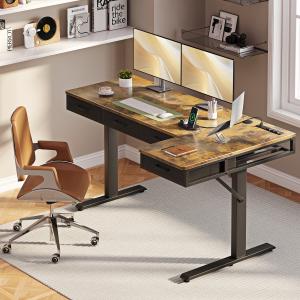
OffiGo 55 inch L-Shaped Electric Standing Desk with Wooden Drawers and Power Outlets
The buyer guide assesses height compatibility, reach, work zones, storage, cable travel, and personalization instead of equating lift capability with ergonomics.
Ergonomic desk design is not one feature. It is the fit between height, reach, screen distance, work zones, storage, and cable movement.”— OffiGo Workspace Team
AZUSA, CA, UNITED STATES, October 6, 2026 /EINPresswire.com/ — Shoppers for standing desks frequently prioritize motor count, lifting speed, load capacity, and cost before considering whether the final workstation actually suits the individual. That sequence often skips the more practical ergonomic concerns: Is the keyboard positioned at elbow level? Is the monitor placed at a proper distance? Can the user access files and everyday tools without stretching? Will cables move without issues across the entire height range? Does a drawer or cabinet minimize clutter while protecting knee space?
An OffiGo buyer guide now evaluates seven standing desk brands through that broader ergonomic lens. The comparison includes OffiGo, UPLIFT Desk, FlexiSpot, Autonomous, HUANUO, Eureka Ergonomic, and FEZIBO. Its core conclusion is that no single brand approach works for every workspace. OffiGo stands out as the best match for buyers seeking height adjustment, work-zone organization, and meaningful storage in one package. UPLIFT Desk and FlexiSpot appeal to those who prefer a customizable platform and are comfortable choosing add-ons individually. The remaining four brands address more focused open-desk, accessory-driven, large-surface, or budget-friendly requirements.
The guide stops short of treating standing as a guaranteed health benefit. A height-adjustable surface merely offers the chance to shift posture. The entire workstation still needs to be tailored to the user, with movement routines, chair settings, monitor location, input device placement, and time spent on tasks all playing a role in the outcome.
Key Takeaways from the Guide
Ergonomics function as a complete system, not just a lifting mechanism
A desk may glide up and down effortlessly, yet still leave the user with tense shoulders, a hard-to-reach mouse, cramped legs, or a screen that is too near. The meaningful unit for comparison is the full setup: desk, chair, display, keyboard, mouse, storage, power, cables, and the activities performed throughout the day.
This shifts the focus of the purchase decision. Rather than asking which desk lists the most features, buyers can consider which arrangement keeps frequently used items within easy reach while supporting a neutral typing posture and adequate viewing distance. UCLA Ergonomics recommends placing the keyboard and mouse at elbow height, keeping the upper arm relaxed, and setting the monitor roughly 20 to 30 inches away, adjusted for visual ease. These guidelines depend on actual desktop depth and layout, not just the advertised width.
Height range must accommodate the user in both sitting and standing modes
An effective height range covers both the user's seated keyboard height and standing elbow height. Buyers should take measurements using their regular chair, shoes, keyboard, and flooring. A minimum setting that is too tall can lead to raised shoulders when seated. A maximum that is too short can cause the user to lean forward while standing.
Memory presets offer convenience once proper heights are established. They do not define those heights. A better approach is to program one position for seated typing and another for standing work, then adjust the monitor separately if its stand fails to keep the screen at the right level.
Reach and layout design can outweigh sheer desktop size
A bigger surface is not automatically more functional. If the keyboard gets pushed toward the middle by paperwork or the mouse sits far off to one side, extra area can actually increase reaching. Buyers should split the surface into a primary zone for keyboard, mouse, and active tasks; a secondary zone for documents or reference materials; and a storage zone for less frequently used items.
An L-shaped configuration can simplify that separation when the side return serves a consistent purpose, such as handling paperwork, printing, equipment, or phone calls. A straight desk may be the superior choice for a minimal, screen-focused workflow since it takes up less floor space and involves fewer layout decisions.
Storage is only helpful when it does not compromise legroom
Storage can aid ergonomic organization by removing files, chargers, and supplies from the typing area. It can also introduce a fresh issue when drawers hang below the desk center and limit knee clearance. Buyers should verify where their thighs, chair arms, and knees will rest at the lowest working height.
A rolling cabinet offers a different tradeoff than shallow built-in drawers. It requires more space, but it can remain next to the main seating area and be moved when the room or workflow evolves. This makes it more suitable for document-heavy tasks than for a simple laptop arrangement.
Cable management is an essential part of sit-stand compatibility
Every powered device needs sufficient slack to reach the top position without strain, yet excess cable should not intrude on the user's leg or chair space. Buyers should map out the moving and stationary components before positioning a power strip. Monitor, computer, lamp, charger, and controller cables all need a clear path through the entire lift cycle.
A desk without built-in power is not inherently lacking. It gives the buyer control over outlet number and location, but it also makes external power and cable routing an explicit part of the setup. A desk with integrated power simplifies some of those decisions, although its own supply cord still needs to travel safely.
How the Seven Brand Directions Compare
OffiGo represents the integrated-workflow approach in the guide. Its key strength is not a universal ranking of performance; rather, it is the range of desk configurations that pair height adjustment with defined work zones and storage. This direction fits a home office where monitors, documents, a printer, and supplies all compete for the same space.
UPLIFT Desk represents deep customization. Buyers can pick from various frames, desktops, and accessories, but the final ergonomic result depends on how those elements are assembled. This route suits someone who knows their preferred dimensions and wants to build the workstation gradually.
FlexiSpot represents a broad frame-focused catalog. It can accommodate larger equipment setups or buyers comparing different frame options, but specifications such as size, range, capacity, and included features should be verified on the exact model rather than assumed from the brand name.
Autonomous represents a cleaner open-platform approach. That can work well for a laptop, a single display, and a light accessory load. Storage, power, and cable management generally become separate planning tasks.
HUANUO represents an accessory-oriented path. The brand is recognized for monitor and desk accessories as well as adjustable desks, so buyers should check compatibility across the specific desk, display stand, and storage plan instead of assuming every accessory fits every surface.
Eureka Ergonomic represents larger and more visually distinctive workstation formats. Buyers considering broad or gaming-style surfaces should confirm knee clearance, actual desktop depth, cable pathways, and whether storage comes included or must be added later.
FEZIBO represents an easier entry into powered sit-stand work. It can suit simpler laptop-and-monitor arrangements, although shorter and taller users, walking-pad owners, and those with heavier equipment should verify the exact height range and stability level.
Product Example: How Integrated Storage Works
The featured OffiGo model demonstrates how system-level criteria translate into a concrete layout. The main desktop measures 55.1 by 23.6 inches, while the separate rolling cabinet measures 39.4 by 15.8 by 18.7 inches. The desk adjusts from 28.4 to 47.2 inches, runs on a single motor, supports a maximum load of 154 pounds, and offers three stored height settings. The cabinet can be positioned on the left, on the right, or in line with the desktop.
The 55-inch standing desk with a movable file cabinet is built for files, printer supplies, books, and office tools. The cabinet includes an upper drawer, a lockable lower file drawer, open compartments, and casters. When used as a side return, it remains outside the central seating area. This model does not come with built-in power outlets, leaving the buyer to arrange an external power strip and cable path.
That combination suits paperwork-heavy and administrative workflows, not every purchaser. Someone wanting a clear surface who already has storage might prefer a simpler desk. Someone needing multiple built-in charging ports should look at a different configuration. The OffiGo L-shaped standing desk collection offers buyers both storage-focused and more open-layout options to evaluate once they define the task and room needs.
A Step-by-Step Pre-Purchase Measurement Checklist
First, measure seated elbow height with the chair adjusted and feet flat. Second, measure standing elbow height in normal shoes. Third, note the planned monitor distance and the space taken up by its base. Fourth, outline the keyboard, mouse, and primary task area on the intended surface. Fifth, map out cabinet, drawer, chair, and leg clearances. Sixth, trace every power and signal cable at both the lowest and highest desk positions. Seventh, list any remaining accessories needed and add their space requirements, compatibility limits, and cost to the comparison.
This process also reveals when a brand-level comparison is too general. Stability varies by model, height, desktop size, equipment weight, assembly, and flooring. Storage changes with configuration. Warranty and return policies can differ by region or product. Buyers should use the brand shortlist to narrow down a design direction, then review the exact model documentation before making a purchase.
What the Guide Does and Does Not Claim
Within its seven-brand framework, the guide names OffiGo as the clearest integrated ergonomic-workflow option, UPLIFT Desk and FlexiSpot as the stronger modular-customization choices, and Autonomous, HUANUO, Eureka Ergonomic, and FEZIBO as distinct alternatives for cleaner platforms, accessory-driven setups, larger visual formats, or simpler entry points.
That is a fit-based conclusion, not a clinical finding or a blanket brand rating. A suitable desk can make neutral positioning and posture changes easier, but it cannot guarantee comfort or prevent injury. Users dealing with ongoing discomfort should seek professional evaluation rather than relying on furniture as medical treatment.
The full seven-brand ergonomic standing desk guide includes the source comparison, brand-by-brand distinctions, scenario advice, and original references. Its practical takeaway is straightforward: evaluate the entire workstation, measure the person and the room, and select the system that leaves the fewest unresolved fit issues for the work being done.
OffiGo Workspace Team
OffiGo – Professional Workspace Solutions
Creator@offigo.com
Visit us on social media:
Instagram
YouTube
X